Friday, December 10, 2010

Storyboard

In my first storyboard I show the picture of the little girl in the orchard first. I used scene to scene in order to show how the paths between the fruit trees will someday turn to roads that go further and further away from home. In the second scene, the backyard has turned into a long path in an immense forest. In the third picture the road is final pavement indicating that the girl is now able to drive legally. The fourth picture shows a road that has now departed from the lush forest in exchange for the fast paced city life.

In the second storyboard I used the children setting up to block a free kick picture and the man praying picture. I used them next to each other in the middle of the story. I tell a story of a day filled with soccer. It is a tournament, but only one team will walk away victorious. In this storyboard I utilized action to action and scene to scene. The first pictures gives a general background setting for a soccer match. The second is an action picture taken during a game, and the third is a man praying for one of his children who are playing that day. The fourth picture shows that out of all the teams in the tournament that day there could only be one winner.

Thursday, November 18, 2010

Graph and Chart


For the chart I gathered information from a data set that searched for on the Roger Williams homepage. I chose to select data from a collection tuition amounts over the last 10 years. The data included too much information to include in one graph and needed more than one measuring stick so I choose only information I knew I could represent graphically (commuters vs. non, arch vs. non, undergrad/grad ect.) I chose to focus on tuition, resident fees, and room and board for an incoming freshman student. 

It was hard to get Excel to show the graph the way I wanted it. The proportions were hard to get right, and it was difficult to call in the proper cells for each piece of graph information. After getting everything to look accurate in terms of the way the graphical information is displayed on the graph, I began to explore the different graph types. The line graphs seemed to be easiest on the eye with limited cognitive load. I chose the 3-D line graph because total and tuition lines overlapped became distracting with a regular line graph. I would have liked to get the X axis labeled years, and the Y "Dollars in thousands" to allow the dependent variable to become integrals of 1 (1,2,3,4,5). 

The single most important thing that is missing from the graph (unless seen with the table) is a title. A "Undergraduate Tuition and Required Fees" title at the top of the graph would have further reduced the cognitive load.

Tuesday, November 9, 2010

Flow Charts

I did not have an amazon.com account before this flow chart, so the only way to complete the assignment was to make one. It was interesting to be experiencing the book buying process online for the first time by creating a flow chart. It was not easy and took a couple renditions. The search box is the most comprehensible tool of any website, which is why I chose it as for the main processes. The subsystems I created with my decision diamonds ensure that the viewer has an amazon account, and that they are able to search for any book or a specific text. The flow chart also walks the viewer through the technical elements of the check out process.

I miss-read the cognitive load/dual coding flow chart assignment. Instead of creating a flow chart for either google scholar or bing and cognitive load or dual coding, I created a flow chart combining all of the options. In order to create a process icon by which the viewer understood to search more than piece of information I inserted a data icon which is represented by a parallelogram. The subsystems in the flow chart are created by two decision icons. The first guarantees a suitable collection of documents returned from a search. The other subsystem allows the viewer to read documents from the suitable search return, but only bookmark the ones which are suitably revenant to the topic. A larger subsystem allows this entire process to continue so that multiple research documents can be gathered.

Explanation Graphic


The Information Graphic I choose to improve is made by a county health system in northern California called Contra Costa Health Services. The graphic itself is a flowchart detailing how to deal with a flu outbreak at a local school. I choose it because it took me a long time understand, so I figured there was a lot of cognitive load problem solving to be done. I also had a couple of ideas to help improve the dual coding used in the flow chart. I am very happy with progress I made between my first couple of attempts and my final graphic.

Thursday, October 28, 2010

How to Make a Spaghetti Dinner

In order to successfully transmit the information need to make a spaghetti dinner I first drew all of the components in the top left corner. The components are a box of noodles, a jar of tomato sauce, two pots, two wooden spoons, plates and utensils, and a strainer. The first graphic represents both pots under high and medium flame (water in one under high flame). The second graphic shows the transfer of the noodles into the water-filled pot and the tomato sauce in the pot under medium flame. A simplified clock attempts to show the amount of time to cook the noodles, and the spiral arrows next to the wooden spoons represents stirring the sauce and noodles. The next step shows the straining of the the noodles, and the transition of the two ingredients into separate bowls. Once the cooked ingredients are placed on a table or eating surface the spaghetti dinner is complete. 

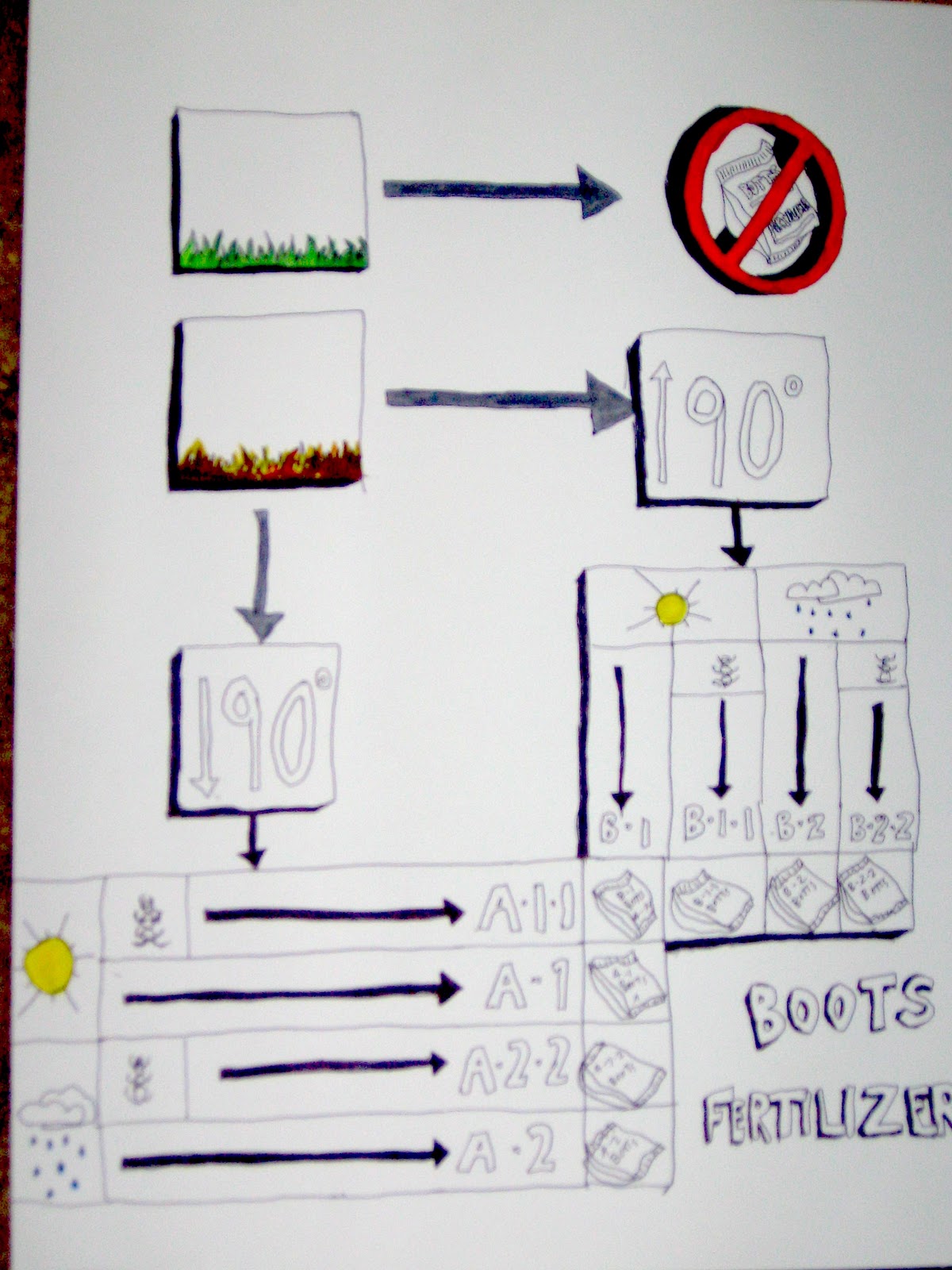
Botts Lawn Care


For Bott's Lawn Care decision support graphic I wanted to make sure it was clear that a healthy, thriving lawn does not need treatment. I was conflicted on how to arrange my graphic on the page, so I made two attempts. Both are organized vertically. My second graphic (top) feels more cohesive because the bold arrows create a focus toward the fertilizer types, and the proximity of the two types of grass health. I was also conflicted about how to represent insects vs. no insects. Although the top graphic appears more visually appealing, it is actually the one with some unintentional mistakes ("boots," A and B fertilizer types switched). The "X" through the insects on the first graphic represent the conditions better then the absence of the insects in the second drawing. Thinking about it now, it would have been really hard to depict health vs. unhealthy grass without the use of color.

Tuesday, October 5, 2010

Collage

The patterns I observed in my collage included organization, balance, color, and rhythm. I also noticed the rectilinear nature of the college elements, and the relationship between graphic images and text. Many of the images on the collage were taken from a skiing magazine which seems to make it the central focus, but I did try to include a variety of subjects and interesting text. 

The general feedback I got on the comments suggested that my collage was organized and focused around skiing and nature. Almost everyone made note of the fact that I used the whole page. I was interested to see a few comments about having a lot of text. When the page started to get filled up the collage became very busy and I didn't want to distract from the images I had chosen. My solution was to add the blue and purple pages on the bottom right for their color in hopes that the small text would be of no interest compared to the other images. Overall the comments matched somewhat closely to my intentions for the collage.